One phone-based app to verify every clock-in with GPS, catch late arrivals the moment they happen, and replace expensive biometric machines and messy attendance registers β built for schools, companies, hospitals, NGOs and business owners running teams across Africa.
It's not your staff. It's not your rules. It's the four silent leaks draining your payroll and your trust every single day.
Buddy punching, forged signatures, torn pages. By payroll day, nobody can prove who was actually present β or who signed in for a friend who never showed up.
Expensive hardware per gate, maintenance contracts, power outages that reset the clock β and it still can't tell you who's late until someone manually checks the log.
Sales reps, riders and remote workers just text you they've resumed. No proof, no location, no photo, no accountability β you're taking their word for it.
Late arrivals, forgotten clock-outs, unexplained absences β you only discover the damage weeks later, when it's far too late to fix or even have the conversation.
No biometric hardware. No paper registers. Just a complete GPS-verified attendance system, engineered for how teams actually run across Africa.
Staff clock in from their own phone β the app checks they're actually within your workplace boundary before it accepts the punch. No hardware, no queues at a gate. Works fully offline too: the same location check runs on the phone's own GPS with no signal needed, and the punch syncs automatically the moment they're back online β built for real network conditions, not just city-centre wifi.
One device is bound to one account. Nobody can clock in for a colleague from their own phone β the account simply won't accept it.
The clock-in radius is capped platform-wide, and device binding can be locked ON β both enforced at the database level, not just in the app UI β so even your own on-site admin can't quietly loosen either one to make buddy-punching easy again.
See who's on the clock, who's late, and who hasn't shown up β in real time, the moment it happens, not weeks later on payroll day.
Message any staff member directly, or send a one-tap announcement to your whole team β about attendance, shifts, training, leave, or anything else β right inside the app. Staff can reply straight from an announcement too, privately to you, and can message each other directly as well β with every conversation visible to you for full oversight. No WhatsApp, no phone credit needed.
Staff can log scheduled breaks and personal permission time right from their clock screen β recorded separately, without hurting their attendance score.
Field staff take a selfie to request remote clock-in β you review the photo and approve or reject from the dashboard before it counts.
Turn it on and watch a moving map β like tracking a ride on Uber or Bolt β of exactly where staff are while they're out on a Permission errand or assignment, complete with their movement trail. Confirm they're where they're meant to be, and reach or trace them fast if anything happens. If a staff member's signal goes quiet for a few minutes, admins get an automatic alert so a closed app or dead phone is never mistaken for silence. Off by default, and staff always see it's on β never silent. Every past outing stays on record too, in Records β pull up the full movement trail for any date range, printable as a PDF or downloadable as CSV.
Every remote selfie is checked against the staff member's registered photo β a warning flag appears if it doesn't clearly match, so you always know what to look at twice.
Running shifts? Configure Day and Night sessions with their own hours β staff pick their shift before clocking in, and late detection follows the right schedule, with its own late-grace period per shift if one should be stricter or more lenient than another.
Forgot to clock out? Punctual can automatically close the session a set number of minutes or hours past shift end β no more sessions stuck open for days.
Goes a step further than the timer-based version above: catches staff who clock in as Work or Break and simply walk off site, auto clocking them out the moment they've been continuously outside the workplace radius for a grace period you choose. Never applies to Permission or Remote sessions, and stores no location trail β just the exit event itself.
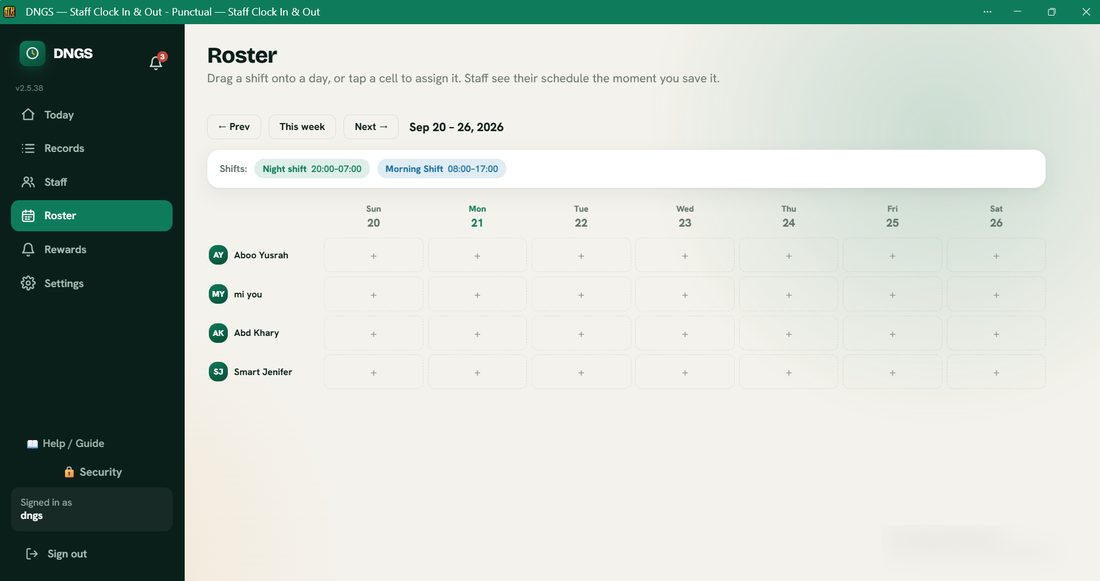
Build the week's schedule on a drag-and-drop calendar β drag a shift onto a staff member's day, or tap to pick one on mobile, with an instant on-screen confirmation and a one-tap "Restore" if you remove one by mistake. The moment you save it, that staff member sees it on their own clock screen under "My Schedule", pre-selected automatically when they clock in β and they can look up any past shift later in a searchable Shift History.
Today, 7 days, 30 days, or any custom range you pick β search, filter and export every attendance record straight to CSV for payroll. (Free Trial gets full access for its first 14 days, then Today/Yesterday/7 days.)
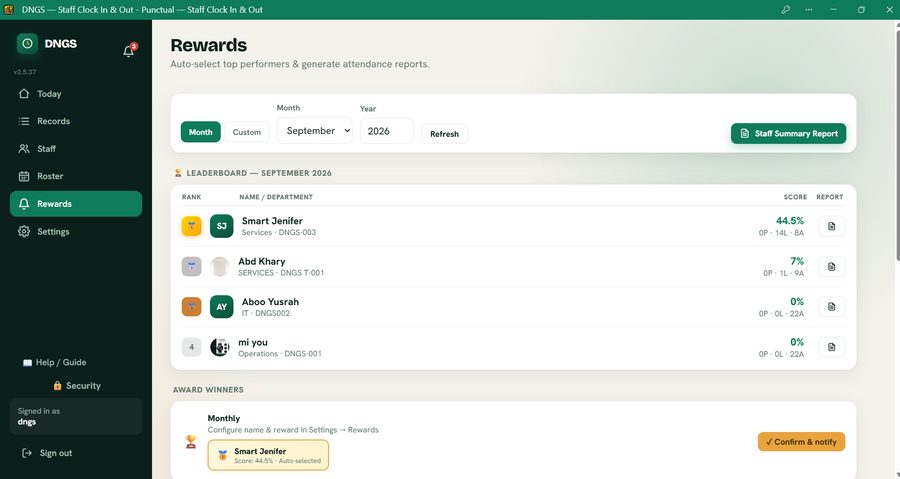
An auto-ranked leaderboard scored on presence and punctuality β turns attendance into something staff actually want to win, not just a rule to obey.
Configure a name and reward for each period, then recognise up to three staff β 1st, 2nd, and 3rd place β auto-selected from the leaderboard and confirmed with one click; each winner is notified automatically. Mark any staff member as Main or Non-teaching/Support staff (cleaners, drivers, minders, trainees, and similar roles) so the main leaderboard stays focused on core staff, then add unlimited Custom Reward Categories β with one tick to auto-scope a category to Support staff, or to specific departments β to give support staff their own leaderboard and recognition.
Individual staff reports or a full organisation summary β branded, with staff photos, working days and a clear present/late/absent breakdown. Ready for payroll.
Define lunch breaks, prayer breaks, or any recurring break by day and time. Set a maximum daily permission window with optional admin approval.
Public and company holidays are excluded from everyone's attendance score automatically. Assign an individual leave period to one staff member without affecting anyone else's numbers.
Every staff member registers a passport-style photo, shown across the admin dashboard, leaderboard and reports β real faces, not just names on a list.
Fingerprint, Face ID or Windows Hello β staff unlock the app instantly on their own device without typing a password every time.
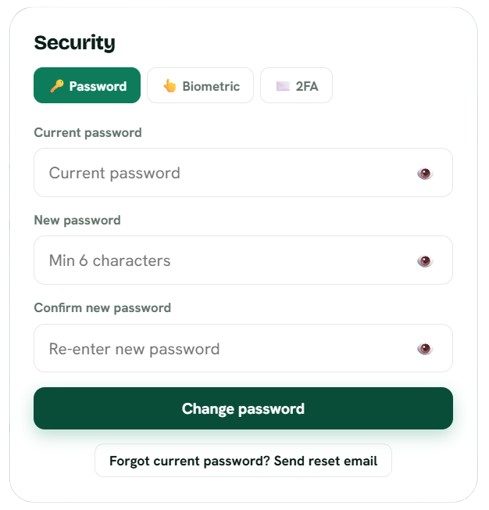
An email verification code as a second login step β for admins and staff alike. Extra protection for attendance records that feed straight into payroll.
Each account is locked to the device it first registered on. Changing phones is a simple admin reset β but nobody can log into two devices at once undetected.
Get notified the moment someone clocks in late or forgets to clock out β via your own free Google Apps Script email and WhatsApp, no monthly alert-service fee.
When we publish an update or a heads-up, it lands straight in every staff member's and admin's in-app Inbox β no email to miss, no separate app to check, and no banner cluttering the screen.
Staff install it straight from the browser in one tap. Updates roll out automatically β no reinstalling, no App Store review delays, works on any phone.
Ten request types β Permission, Leave, Sick, Maternity, Paternity, Bereavement, Late Arrival, Early Departure, Clock-Out Issue, or Other in their own words. One admin approval screen, and approved leave automatically keeps attendance scoring fair.
A real notification inbox, not just a toast that disappears β request approvals, rejections, platform announcements and updates all land here for both staff and admins, with delete, restore, permanent delete and a one-tap Delete all in Trash. Dismiss an announcement once and it stays dismissed on every device you sign in from. Available in the mobile view too, not just desktop.
Someone locked out and the reset email isn't arriving? Reset their password from Staff Management and hand them the new one directly β in person, by phone or WhatsApp. When a staff member without a phone later gets one, "Give own login" attaches a real sign-in to their existing record, so every bit of attendance, roster and reward history carries over. Deactivating someone also blocks them from signing in or clocking in the moment you confirm.
Staff and admins each choose their own look β Light, Dark, or follow the device automatically. No squinting at a bright screen during a night shift.
Not everyone on your team owns a smartphone β an elderly staff member, a struggling worker, a student volunteer. Add them with just a name, and an admin clocks them in/out on their behalf, right from the workplace β with the same GPS geofence check and a required photo every time, fully logged, so it's never a loophole.
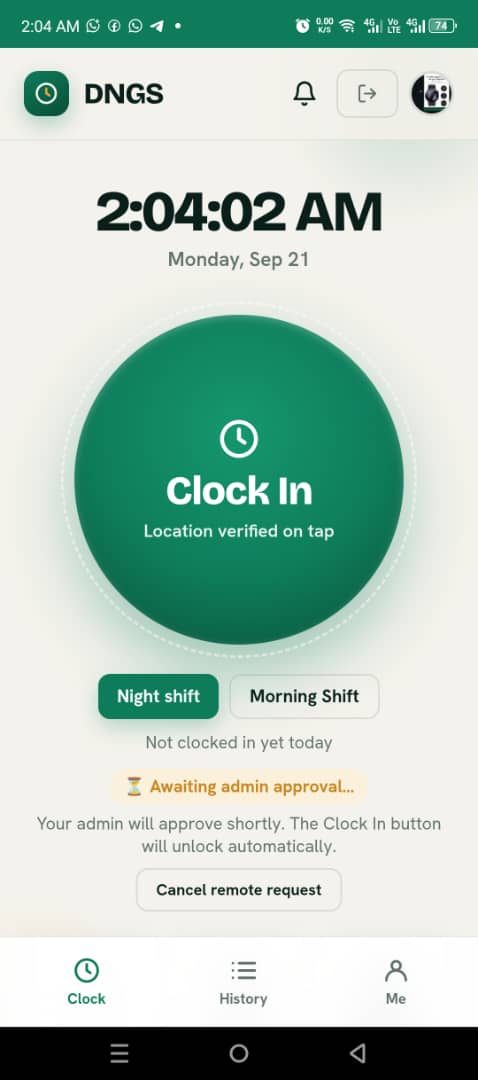
A single large button, GPS checked automatically on every tap, and an admin dashboard that updates live as your team clocks in.
An auto-ranked leaderboard, real prizes for real winners, and branded PDF reports ready the moment payroll needs them.
A drag-and-drop weekly calendar for shift-based teams β assign staff to shifts, and they see it on their own clock screen the moment you save.
Biometric login, two-factor authentication and face-match verification β security that a padlock and a signature sheet never gave you.
Create your organisation in seconds β no card required. Get 14 days to explore the full admin dashboard.
Set your GPS geofence once from Settings β this is the boundary staff must be within to clock in.
Staff download the app, enter your 6-character code, add their photo β done, no developer needed.
Staff clock in from their own phone. You see it live on your dashboard, with alerts for late arrivals.
Built specifically for African schools and teams β not a Western HR platform with a currency dropdown bolted on. Grouped by category β tap any row to expand it.
| Feature | Punctual | Biometric Machine | Paper Register |
|---|---|---|---|
| GPS-Verified Clock In / Out | β | β | β |
| Anti-Buddy-Punching (Device Binding) | β | β | β |
| Remote / Field Staff Clock-In With Photo | β | β | β |
| AI Face-Match Verification | β | β | β |
| Day / Night Shift Support | β | Extra config fee | β |
| Auto Clock-Out For Forgotten Sessions | β | β | β |
| Auto Clock-Out on Leaving Workplace (Geofence Exit) | β | β | β |
| Shift Roster Builder (Drag-and-Drop Calendar) | β | β | β |
| Feature | Punctual | Biometric Machine | Paper Register |
|---|---|---|---|
| In-App Messaging & Broadcasts (Admin β Staff, Staff β Staff) | β Lite+ | β | β |
| Instant WhatsApp Alert on Late Arrival | β Free | β | β |
| Instant Email Alert on Forgotten Clock-Out | β Free | β | β |
| Browser Reminder Notifications | β | β | β |
| Platform Announcements & Updates | β | β | β |
| In-App Inbox With Delete / Restore / Delete All | β | β | β |
| Staff Requests (Permission, Leave, Sick & More) | β | β | β |
| Feature | Punctual | Biometric Machine | Paper Register |
|---|---|---|---|
| Biometric Login (Fingerprint / Face ID) | β | β | β |
| Two-Factor Authentication | β | β | β |
| One-Device-Per-Account Binding | β | β | β |
| Role-Based Admin / Co-Admin Access | β | β | β |
| Instant Staff Deactivation (Blocks Sign-In & Clock-In) | β | β | β |
| Admin Password Reset (No Email Needed) | β Lite+ | β | β |
| Restore Removed Staff & Delete Forever | β Lite+ | β | β |
| Payroll (Pay Rates, Run Payroll, History & Export) | β Lite+ | β | β |
| Email Records & Payroll Reports | β Lite+ | β | β |
| Distance-From-Workplace Column in Records | β | β | β |
| Live Location Tracking (Permission Sessions) | β | β | β |
| Feature | Punctual | Biometric Machine | Paper Register |
|---|---|---|---|
| Custom Date Range Records + CSV Export | β | Basic only | β |
| Branded PDF Reports With Staff Photos | β | β | β |
| Attendance Leaderboard & Scoring | β | β | β |
| Monthly / Quarterly / Annual Awards β Top 3 + Custom Categories | β | β | β |
| Leave & Holiday-Aware Scoring | β | β | β |
| Feature | Punctual | Biometric Machine | Paper Register |
|---|---|---|---|
| Hardware Required | None β any phone | Device per gate | None |
| Setup Time | Under 15 minutes | Days, with installer | Immediate |
| Maintenance Cost | None | Recurring service fee | None |
| Works Across Multiple Locations | β | Extra device per site | β |
Things you'd normally pay separate monthly fees for elsewhere β all built into your dashboard, all one tap away.
Connect your own free CallMeBot number β no per-message fee, no monthly alert-service subscription.
A free Google Apps Script webhook sends late-arrival and forgotten-clock-out emails, no subscription ever.
Attendance summaries, individual reports and raw records β export whenever payroll needs the numbers.
Upload your logo, set your contact details β your organisation's identity shows across the app and reports.
Deactivate (it blocks sign-in and clock-in instantly) and remove staff on every plan. On Lite and Gold, restore removed staff or delete them forever, reset a lost device or a forgotten password, or ask someone to retake an unclear photo.
Set a monthly or hourly rate per person, run payroll for any period from the hours already recorded (overtime included), add bonuses or deductions, keep a history and export CSV or PDF. Lite and Gold, owner only.
Email the attendance table or a payroll run to your accountant or board in one tap, through your own free email webhook. Lite and Gold.
Records shows how far from the workplace each first clock-in was, flagged when it is outside your radius, and included in CSV and PDF exports.
Consultants, IT firms and agents can refer organisations with a personal code and link and get credited. Become a partner.
A warning banner flags anyone still "on the clock" from a previous day, so it never quietly slips through payroll.
One platform, unlimited organisations β each fully isolated with its own staff, schedule and data.
A help guide for admins and staff, right inside the app β no separate manual to hunt down.
Round recorded hours to the nearest 5, 10 or 15 minutes, and stop staff clocking in too early β your totals match how you actually run payroll.
A companion to GPS for indoor spots where location drifts β restrict clock-in to your office Wi-Fi network, no extra hardware needed.
Set a daily-hours threshold and multiplier β Records and CSV export automatically split regular vs. overtime, weighted for payroll.
Lock a pay period once you've run payroll β manual clock edits for those dates are blocked until you deliberately unlock it again.
Start free, upgrade only when you're ready. Every plan is priced for African schools and businesses, not Silicon Valley budgets.
Gold includes up to 100 staff. Need more room on any plan? Pick a pack, pay securely via Fincra, and the extra seats are added on top of your plan's limit once your payment is confirmed. Same simple rate, $0.50 per staff seat.
After paying, open Settings > Request an Upgrade in the app and send your request so we can match your payment.
β Curious exactly what's included? See the full extras list above.
"[Add a quote from one of your schools or teams here β what changed for them since switching to Punctual.]"
"[Add a quote here β e.g. how much time or money they saved not using a biometric machine or paper register.]"
"[Add a quote here β e.g. how the rewards/leaderboard changed staff punctuality.]"
π Placeholder cards β swap in real quotes from your schools & teams before publishing.
No. Punctual runs entirely on the phones your staff already own. No fingerprint scanners, no gate machines, no installation fee.
You pin your workplace location once in Settings. When staff tap Clock In, the app checks their phone's GPS is within your set radius before accepting the punch β outside it, they're prompted to use Remote clock-in instead.
No. Each account is bound to one device. If someone tries to log in and clock in from another person's phone, the app blocks it β this is what stops buddy-punching completely.
They tap "Work remotely", take a selfie, and it's sent to you for approval. On the Gold plan, the selfie is also checked against their registered photo, and you're warned if it doesn't clearly match.
Yes, on the Lite plan and above. Configure as many named shifts as you need, each with its own hours β staff pick their shift before clocking in, and late detection follows the correct one.
No. You connect your own free CallMeBot WhatsApp number and a free Google Apps Script email webhook β Punctual sends late-arrival and forgotten-clock-out alerts through them at no extra platform fee.
For your first 14 days, everything is unlocked β the same feature set as Gold β so you get a real feel of what Punctual can do before committing to anything. Once those 14 days pass, your organisation automatically settles to the bare Free Trial feature set (GPS clock in/out and the live dashboard) until you choose a plan β Basic, Lite or Gold. Nothing is deleted and there's no auto-charge without your action; you simply pick a plan when you're ready to unlock everything again.
Yes. Punctual is built multi-tenant β each organisation you register is fully isolated, with its own staff, schedule, geofence and data, all under one platform.
Yes. Every record is saved securely to your organisation's private account, accessible only to your admins β never shared with other organisations on the platform.
An admin resets their device binding from Staff Management in one click β they simply log in again on the new phone and it's re-bound automatically.
Yes, on the Gold plan. Turn on a second login step using an emailed verification code β for admin accounts and independently for every staff member.
Yes. Set public and company holidays that apply to everyone, define leave types, and assign an individual leave period to a specific staff member β their score stays fair without affecting anyone else's.
Free Trial covers up to 5 staff, Basic 10, Lite 20 and Gold 100. If you need more on any plan, add extra staff seats in packs β 10 staff for $5, 20 for $10, 30 for $15, 40 for $20, 50 for $25 or 100 for $50 β paid via Fincra from the "Extra seats" box in the pricing section or inside the app (Settings > Request an Upgrade). The seats are added on top of your plan's limit once your payment is confirmed.
Yes, on Lite and Gold. The account owner sets a monthly or hourly rate per person, picks a period and Punctual calculates pay from the recorded hours, paying overtime at your overtime multiplier. You can add bonuses or deductions, keep a history and export CSV or PDF. It does not calculate tax or pension, so review the figures before you pay.
Yes. Consultants, IT firms, associations and agents can get a personal partner code and referral link, and are credited for organisations that sign up through it. Commission is agreed individually. See the Partners page to apply.
Somewhere right now, a signature is being forged, a machine is jammed, or a late arrival is going unnoticed. Stop guessing who was actually there.